


Package Tracker: Track Parcels
3.9798.00 Reviews
App Specs
- Version
- 2.9.9
- Updated On
- License
- Free
- Downloads
- 500,000+
- Developer
- Package Tracker
- Categories
- Shopping
- Platform
- Android
Screenshots
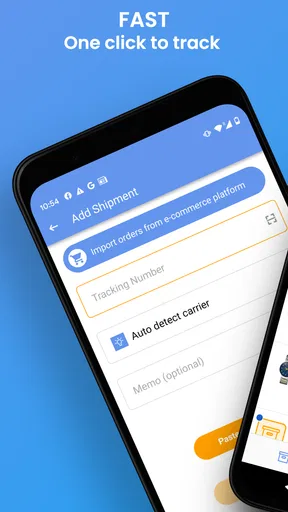
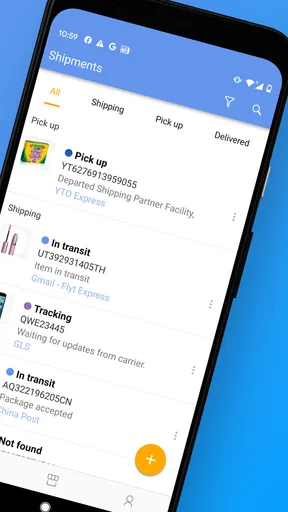
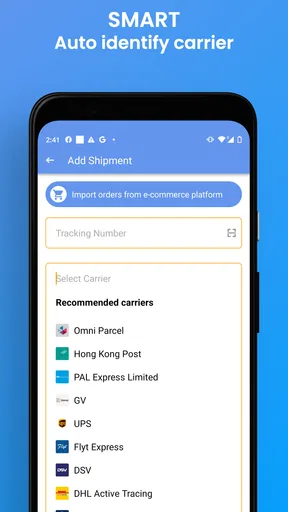
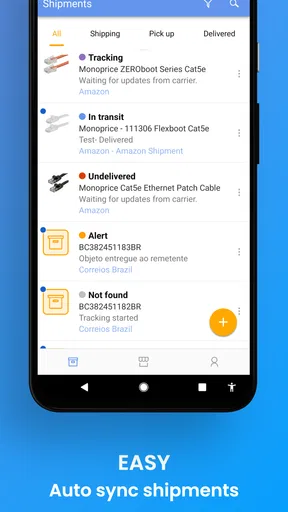
 Analysis by AppCompare
I judge a parcel tracker by a simple standard: can I bring several deliveries together, understand what has changed, and avoid checking each carrier’s site one by one? That is the everyday problem Package Tracker: Track Parcels is meant to solve. I’d consider it most useful when I have orders moving through different delivery networks and want one place to keep an eye on them, rather than another shopping app full of distractions.
What I would check before relying on it
Before making any tracker part of my routine, I’d think about how I usually receive tracking details. If I tend to have the tracking number handy, adding a shipment is straightforward. If I mostly rely on order confirmation emails, I’d first check whether I’m comfortable copying the number across myself. A tracker is only convenient when adding an item feels easier than returning to the original message whenever I want an update.
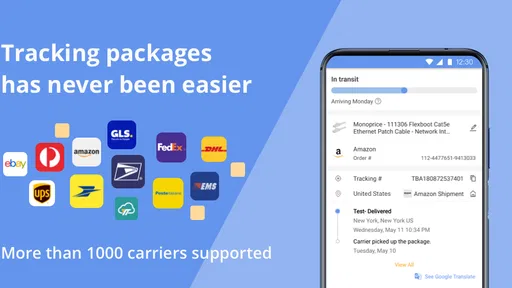
I’d also consider whether I want a broad overview or the most detailed information from one carrier. A multi-carrier app is appealing when deliveries come through services such as UPS, USPS, FedEx, DHL, Poste Italiane, TNT, and others. But if nearly everything I receive uses one carrier, that carrier’s own tracking page may already cover my needs. The real decision is whether combining shipments saves enough small bits of time to earn a place on my phone.
Where a shared tracking view helps
The app is a shopping tool from Package Tracker, and its focus is practical rather than social or promotional: keeping parcel progress together. I can see the appeal for someone ordering from several shops, sending occasional packages, or managing deliveries for a household. Instead of remembering which carrier handles each order, I can use one app as a central place to check the tracking numbers I have added.
That central view is especially handy during a busy week. Imagine ordering household supplies from one shop, a gift from another, and sending a return at the same time. A carrier-by-carrier routine means opening several pages and keeping the numbers straight. With a tracker, I can group the shipments in one place and check their latest reported progress together. It does not make a parcel move faster, but it can make the waiting less scattered.
For that kind of use, I’d add a shipment as soon as I receive its tracking number, while the order confirmation is still easy to find. I’d also scan a barcode when one is available rather than typing a long code by hand; that small choice can prevent a misplaced digit from sending me down the wrong track. If I’m tracking several parcels, I’d make a habit of checking the shipment identity before acting on a status update, especially when two orders are arriving around the same time.
Using it day to day
I use this section to focus on the small habits that make a shared parcel view genuinely helpful: adding a shipment while its tracking number is easy to find, checking alerts selectively, and knowing when a carrier’s own page is the better next step. Those choices keep the routine useful rather than noisy. From there, it is worth considering which tracking approach best fits different delivery habits.
Worth Reading Before You Choose

EA SPORTS FC Mobile 26 Is a Bigger Football Game, but It Takes Time

Flipboard Shows What News Apps Must Do Beyond the Feed

Switching to Android Auto Means Rethinking Your Driving Routine

Google Calendar Makes a Crowded Week Easier to Manage

Ludo King Makes the Most of the Minutes Between Plans

Baby Panda World Brings Quick Play to Modern Phones, but Its Game Library Feels Busy
Updates are useful, with a practical caveat
Status notifications can spare me from repeatedly opening a tracking page just to see whether anything has changed. I’d switch them on for parcels where timing matters, such as a delivery I need to bring indoors, and be more selective with less urgent orders. That keeps alerts useful instead of turning every routine movement into another interruption.
There is a trade-off with any multi-carrier tracker: the app depends on the information made available through the carrier’s tracking process. A status may not change the moment a parcel moves, and a quiet period does not automatically mean something has gone wrong. When a delivery is urgent or a status seems unclear, I’d use the carrier’s own tracking page as a second check. The tracker is a convenient overview, not a substitute for the carrier when I need to investigate a specific exception.
Who may prefer another approach
If I only receive a parcel now and then, saving the carrier’s tracking page or checking the shop’s order screen may be enough. Those options keep the routine simple and avoid maintaining another list. Likewise, someone who wants the most complete information about a single shipment may prefer starting with the carrier responsible for it. A general tracker makes more sense when the convenience of one overview outweighs the extra step of adding shipments.
I’d also think carefully before expecting a tracker to handle every part of an order. Tracking follows a parcel’s reported journey; it is not the same as managing a purchase, changing an address, arranging a return, or contacting a retailer. For those tasks, I’d go back to the seller or carrier. Keeping that distinction in mind avoids blaming the tracking app for decisions and services controlled elsewhere.
Price, fit, and the decision to switch
The app is free to download, with in-app purchases ranging from $2.99 to $18.99 per item. I’d start by using the free option for my ordinary tracking needs and decide whether any paid item is worthwhile only after I understand what I personally need. Someone with a few occasional parcels may have little reason to spend; a frequent online shopper may value a more consolidated routine enough to look at the available purchases.
On Android, the current version is 2.9.9 and the minimum operating-system requirement is Android 5.0. The app is rated for Everyone. Its average rating is 3.9 from around 4,200 ratings, with 799 written reviews, and it has passed 500,000 installs. Those figures suggest that it has found an audience, while the rating also gives me reason to approach it as a useful tool to try rather than assume it will suit every tracking habit. It was released on August 31, 2021.
Switching from separate carrier pages does not require abandoning them. I’d keep using the familiar pages for the occasional shipment that needs closer attention and add only the parcels I want to monitor in one place. That gradual approach is low effort: if the overview helps, I can make it part of my routine; if not, I can return to checking orders individually without changing how I buy or ship.
Getting Started with Package Tracker
Setting up Package Tracker: Track Parcels was a breeze. Available on both Android and iOS, the app can be downloaded straight from the Google Play Store or Apple’s App Store. Once installed, you just need to enter your tracking number, and boom! You're all set.
The interface is super intuitive. Right off the bat, you’ll notice a clean design that makes navigating through your deliveries a piece of cake. You can easily add new parcels, view current shipments, and even check the history of past deliveries. No more rummaging through old emails to find tracking numbers!
Features that Stand Out
One of my favorite features is the real-time updates. The app syncs with a ton of carriers worldwide, providing up-to-date information on where your package is. It’s like having a personal assistant keeping an eye on your mail.
Another cool feature is the notification system. You can customize alerts to let you know when there’s a status change. Whether it’s in transit, out for delivery, or delivered, you'll get a ping right away. This is a lifesaver for those of us who tend to forget when something’s due to arrive.
User Experience
Now, let’s talk about the user experience. The app’s performance is snappy. There’s no noticeable lag when switching between screens or updating information. It feels like the developers really put a lot of thought into making the app both efficient and user-friendly.
The app also supports barcode scanning, which is a nifty little feature. Instead of manually entering the tracking number (and let's face it, we all hate doing that), you can just scan the barcode. It’s quick, easy, and reduces the risk of typing errors.
Security and Privacy
In today’s digital age, security is paramount. Thankfully, Package Tracker: Track Parcels takes your privacy seriously. The app does not require unnecessary permissions, and your data isn’t shared with third parties. It’s always reassuring to know that your package details are kept safe and sound.
Final Thoughts
All in all, if you’re someone who frequently shops online or sends packages often, Package Tracker: Track Parcels is a must-have. It takes the stress out of waiting and wondering where your package is. With its user-friendly interface, real-time updates, and comprehensive carrier support, it’s a solid companion for anyone looking to streamline their delivery tracking.
Now, go ahead and give it a try. Trust me, once you start using it, you’ll wonder how you ever managed without it!
Pros
- User-friendly interface for easy navigation.
- Supports multiple carriers worldwide.
- Real-time updates on parcel status.
- Customizable notifications for tracking.
- Secure and private data handling.
Cons
- Ads can be intrusive at times.
- Limited features in the free version.
- Occasional delays in update sync.
- Requires internet for full functionality.
- No dark mode available.
FAQs for Package Tracker: Track Parcels
What features does Package Tracker offer to help manage parcel deliveries?
Package Tracker provides real-time tracking for multiple carriers, allowing users to monitor their parcels from dispatch to delivery. The app offers notifications for status updates, estimated delivery times, and the ability to track multiple packages simultaneously. Users can also scan barcodes for quick entry and access detailed tracking histories.
Is Package Tracker compatible with all major shipping carriers?
Yes, Package Tracker supports a wide range of global carriers, including USPS, FedEx, DHL, UPS, and more. The app continuously updates its list of supported carriers to ensure users can track their packages from various delivery services, making it a versatile tool for anyone receiving shipments worldwide.
How user-friendly is the Package Tracker interface?
The interface is designed to be intuitive and easy to navigate, suitable for users of all experience levels. With a clean layout, users can quickly add tracking numbers, view parcel statuses, and receive notifications. The app also offers customizable settings, allowing users to tailor their experience to their preferences.
Are there any security concerns when using Package Tracker?
Package Tracker prioritizes user privacy and data security. The app does not require unnecessary permissions and uses encryption to protect your tracking information. Additionally, it does not store personal data beyond what is necessary for tracking purposes, ensuring a secure and private experience for users.
Is there a cost associated with using Package Tracker, and what platforms is it available on?
Package Tracker offers a free version with basic features, while a premium version is available for users seeking advanced functionalities like ad-free usage or more detailed tracking options. The app is available for both Android and iOS platforms, providing a seamless tracking experience across different devices.


